Installation
Start a local NAF application and check its first HTTP response. For your first project,
use the starter below; it provides the application layout and a working welcome page.
The core-only project is an alternative for a small HTTP service.
The Composer vendor is naf; nafphp is the GitHub organisation.
Requirements
- PHP 8.3 or newer and Composer.
- PHP's JSON extension. Forms also use
mbstring; database access needs PDO and its driver. - A writable project directory. Sessions and logs need writable storage at runtime.
Starter 0.2.5+ includes Framework 0.2.12 and does not require PDO. Database-backed features still need PDO and their database driver.
Older starter installations
Starter 0.2.4 locks Framework 0.2.9, which still requires PDO. Framework 0.2.12 removes that core requirement. See starter versions and updates for the dependency update; adding a database integration still requires its driver.
Start with the application skeleton
Run this from the directory in which you keep your projects:
composer create-project naf/app nafphp-demo
cd nafphp-demo
APP_ENV=dev php -S 127.0.0.1:8000 -t public
composer create-project naf/app nafphp-demo
cd nafphp-demo
$env:APP_ENV = "dev"; php -S 127.0.0.1:8000 -t public
APP_ENV=dev selects detailed local error pages for this server process. You can instead
put APP_ENV=dev into a .env file in the project root, which works on every platform;
Your first application does that.
Open http://127.0.0.1:8000/. You should see the NAF welcome page:
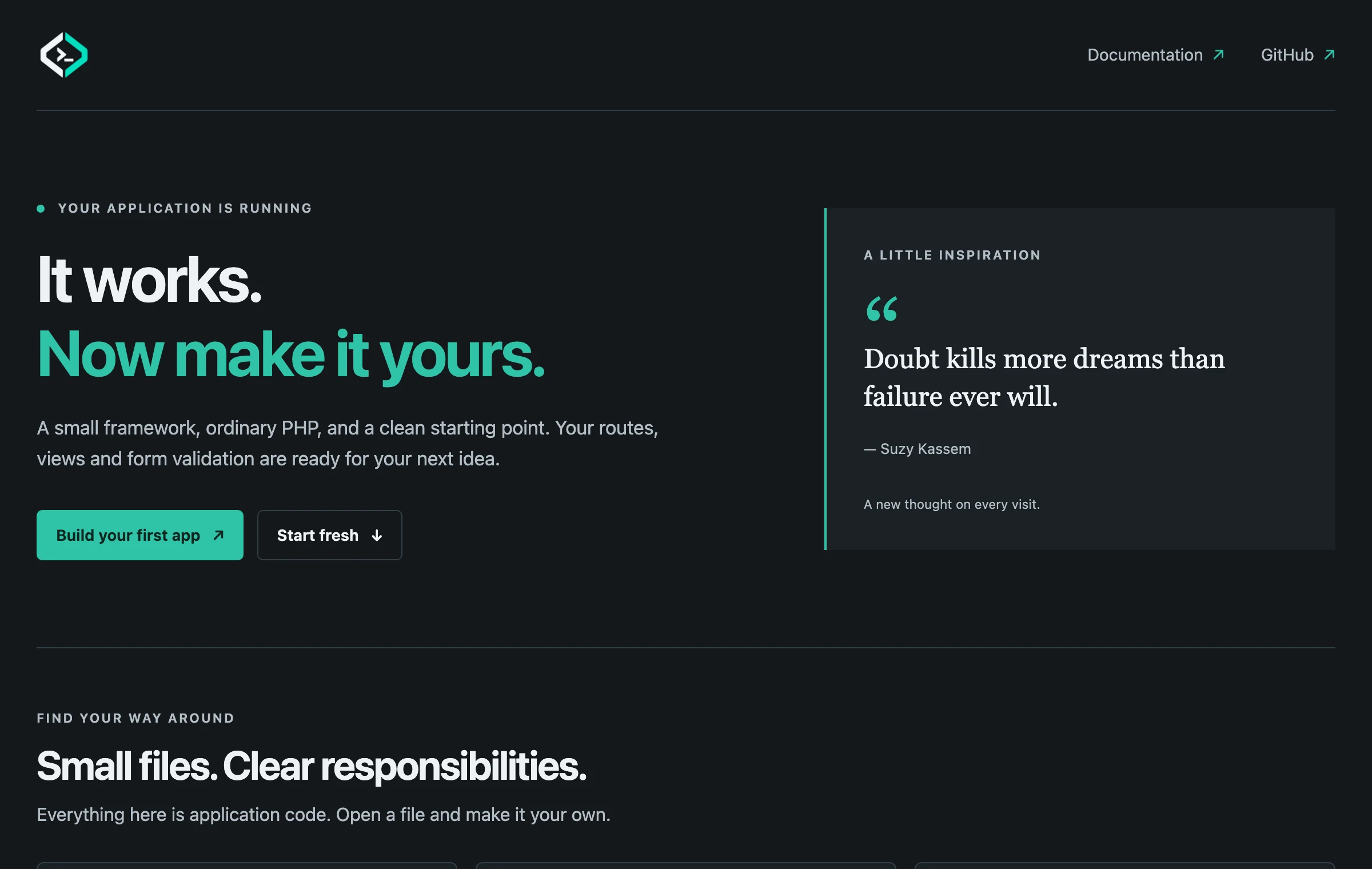
Stop the development server with Ctrl+C. Keep it bound to localhost; on a deployed site,
configure the web server's document root as this project's public/ directory.
The starter installs naf/framework, naf/view and naf/form; naf/session arrives through
the form package. It also registers the App\ namespace with Composer.
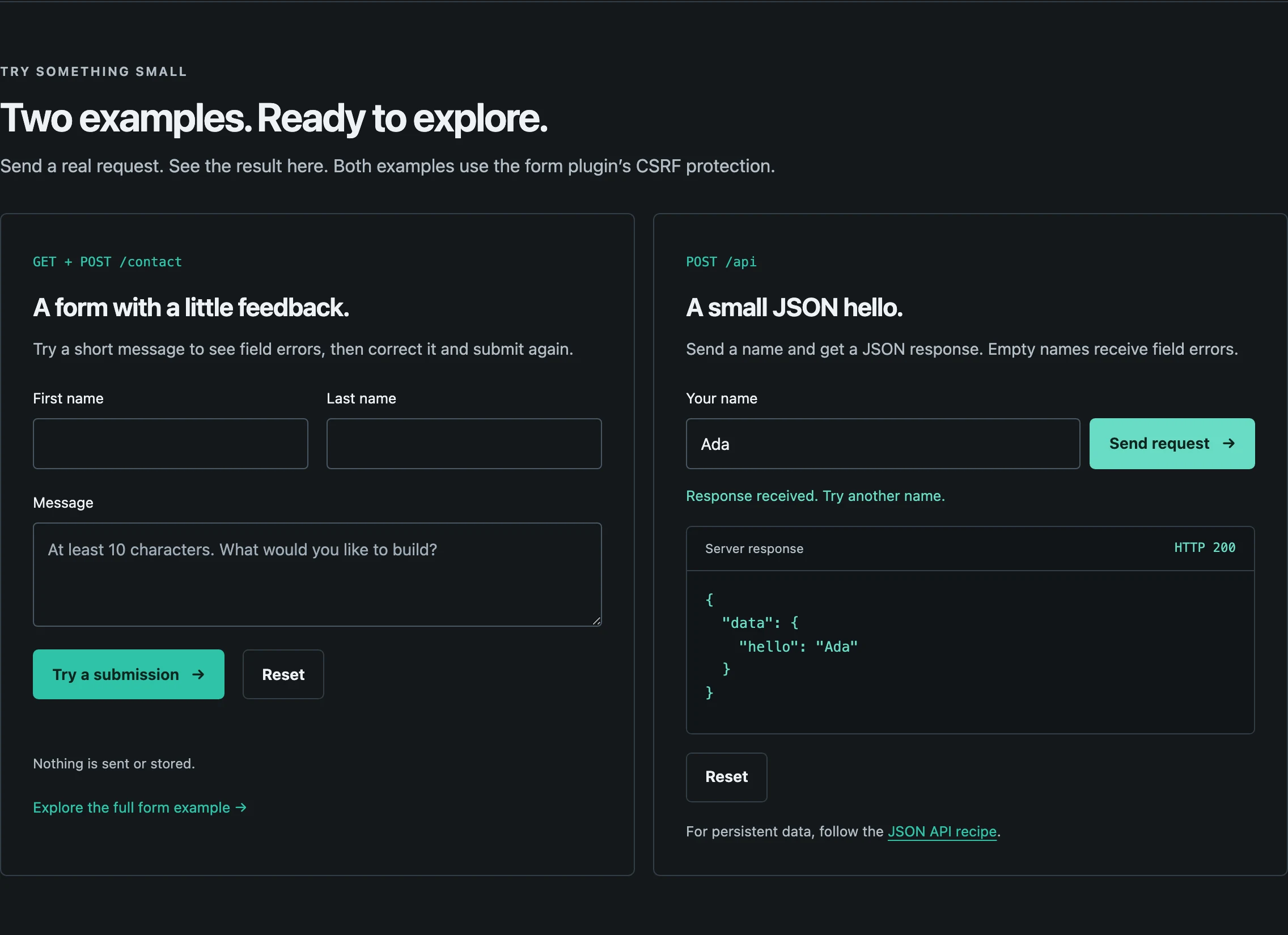
The welcome page links to the source files that produce it and includes two interactive
examples: a contact form and a JSON request. They use fetch() to show field errors,
success feedback, the JSON response and the HTTP status without leaving the page; the
normal form submission still works without JavaScript. Both examples are protected by the
form plugin's CSRF check. The contact form only validates; it does not send or store a
message. Start fresh opens the cleanup steps, with Copy buttons for the terminal
commands; it does not delete files itself. The showQuote setting in app/config.php
switches the rotating quote panel off.
Continue with Your first application. It replaces the starter demonstration with complete files you can copy, then verifies both an HTML page and a JSON endpoint. You can follow it directly after a fresh installation. If you are continuing an older project, check starter versions and updates first.
If the welcome page does not appear
| What you see | What to try |
|---|---|
| Composer reports a missing PHP extension | Enable the named extension for the PHP binary running Composer; php --ini shows its configuration files |
| The server cannot bind port 8000 | Stop the earlier server or use a free port, such as 8001, in both the command and browser URL |
| The browser cannot connect | Keep the terminal running the PHP server open and use the address printed there |
| A PHP error or unexpected page | Confirm this terminal is in nafphp-demo/ and that the server uses -t public; inspect its terminal output |
For more detail, use Troubleshooting. You can return to installation after resolving the specific error; a new project is usually unnecessary.
Core-only project
For a service without templates or browser forms, create an empty directory and these files. This is a separate starting point; do not replace the starter's Composer file with this one.
mkdir naf-api
cd naf-api
mkdir -p app public
{
    "name": "example/naf-api",
    "require": { "php": ">=8.3", "naf/framework": "^0.2.12" },
    "autoload": { "psr-4": { "App\\": "app/" } }
}
composer install
<?php

define('BASE_PATH', __DIR__);
require __DIR__ . '/vendor/autoload.php';

use function Naf\app;

app()->run();
<?php

require dirname(__DIR__) . '/bootstrap.php';
<?php

use function Naf\{json, route};

route()->add('GET', '/', fn() => json(['ok' => true]), 'home');
APP_ENV=dev
php -S 127.0.0.1:8000 -t public
In another terminal, curl http://127.0.0.1:8000/ should return {"ok": true}
(with whitespace for readability). This path needs no view, form, session or database plugin.
For a complete application using this structure, continue with the
JSON API without a database. Follow that tutorial in its own
directory; it includes its own bootstrap, routes and Composer file.
Starter versions and updates
These notes are for checking an existing project or choosing dependency updates. A fresh starter installation can proceed directly to Your first application.
Starter 0.2.5 requires and locks framework 0.2.12, form 0.2.4, session 0.2.3
and view 0.2.3 (with Nyholm PSR-7 1.8.2). Its minimum constraints retain the framework,
form and view fixes even with the lowest dependency resolution. Fresh create-project
installations work with their committed lock file; no follow-up update is needed.
The starter no longer requires PDO. Framework supplies HEAD fallback, automatic OPTIONS,
405 responses with Allow and the optional handle() request API; app()->run() remains
unchanged. Form checks every unsafe method and provides csrf()->token(); framework guards
work under CLI and header listeners compose. The package overview lists releases.
Versions included in starter 0.2.4
Starter 0.2.4 locks Framework 0.2.9, Form 0.2.4, Session 0.2.3 and View 0.2.3.
Its framework dependency requires PDO. Use the update command below to adopt the
current framework; the normal bootstrap remains app()->run().
Versions included in starters 0.2.2 and 0.2.3
Starters 0.2.2 and 0.2.3 ship the same working dependency lock: framework 0.2.3,
form 0.2.2, session 0.2.1 and view 0.2.1. They exclude Nyholm PSR-7 below 1.8.2 to avoid
PHP 8.4+ deprecation errors. The welcome page, /contact form and POST /api
demonstration work directly after installation; no extra Composer update or response
listener is needed. Starter 0.2.3 adds the interactive welcome page and Start fresh
guidance; its dependencies are unchanged.
For an application created from an older starter, update the required minimum versions:
composer require 'naf/framework:^0.2.12' 'naf/form:^0.2.4' 'naf/view:^0.2.3' --with-all-dependencies
To move a new or existing project to the current compatible releases, run composer update
and test your application before deploying it. Commit composer.lock; deployments should use composer install to reproduce
that tested dependency set.
Review the Framework 0.2.12 migration notes
when updating an older framework.
Environment and next steps
Use APP_ENV=dev locally, APP_ENV=test for tests and APP_ENV=prod in production.
Use these exact values: production is not the production constant. Keep .env and
.env.local out of version control. See Configuration.
- Your first application — a website and a JSON endpoint.
- Application scenarios — complete small projects, from two HTML pages to a storage-free JSON API.
- Choosing packages — add only what your application needs.
- Requests and responses — read incoming data and return a response.